The Internal Packet Filter: Fine-Grained ACLs for Mesh Networks
Traditional VPNs treat the VPN network as trusted. Once you're connected, you can reach any machine, any port. TunnelMesh doesn't do this.
The packet filter sits between the Noise decryption layer and the OS network stack. Every decrypted packet passes through it before touching anything else. The default verdict is drop.
Why Default-Deny?
Being on a network doesn't mean you should trust everything on it. A mesh might include developer laptops, CI runners, production servers, and IoT devices; they shouldn't all have equal access to each other.
Default-deny flips the model: instead of "block what you don't want," you say "allow exactly what you need." It's more work to set up the first time, but it's much harder to accidentally expose something.
What's Always Allowed
Two categories bypass the filter automatically:
- ICMP: ping and traceroute always work. You need diagnostic tools to function regardless of policy.
- TunnelMesh service ports: the ports the coordinator and peers use to operate the mesh itself. Without these, the mesh can't function.
Everything else (SSH, HTTP, your database port, your application ports) needs an explicit rule.
The Rule Hierarchy
Rules come from four places, evaluated from most to least specific:
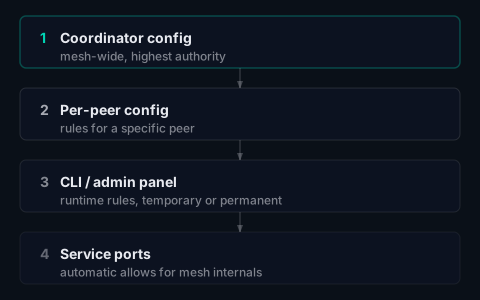
The most restrictive rule that matches wins. A coordinator-level deny isn't overridable by a peer-level allow.
Writing Rules
Rules specify who's sending, who's receiving, what protocol, what port, and what to do:
# Allow SSH from admin peers to everyone
tunnelmesh filter add \
  --src all_admin_users \
  --dst everyone \
  --proto tcp --port 22 \
  --action allow

# Allow a specific peer to reach a service port
tunnelmesh filter add \
  --src laptop \
  --dst build-server \
  --proto tcp --port 8080 \
  --action allow

# Block a specific peer from a sensitive host
tunnelmesh filter add \
  --src untrusted-node \
  --dst database-server \
  --action deny
--src and --dst accept peer names, peer IDs, or group names (everyone, all_admin_users, or custom groups you define). For coordinator-level rules, use peer IDs; they're stable across renames.
Temporary Rules
Useful for debugging without permanently changing policy:
# Allow access for 10 minutes, then it expires
tunnelmesh filter add --src laptop --dst build-server --proto tcp --port 8080 --action allow --ttl 10m

# See all active rules
tunnelmesh filter list

# Remove a rule by ID
tunnelmesh filter remove <rule-id>
Monitoring the Filter
The filter exports Prometheus metrics for every evaluation:
tunnelmesh_filter_packets_allowed_total  (labelled by src/dst peer)
tunnelmesh_filter_packets_dropped_total  (labelled by src/dst peer and rule)
An unexpected spike in dropped_total for a specific peer pair is almost always a misconfigured rule. tunnelmesh filter list shows which rule matched last for any given flow.
See the Internal Packet Filter docs for the full configuration reference.
TunnelMesh is released under the AGPL-3.0 License.