NFS Over TunnelMesh: Secure File Sharing Across the Mesh
S3-compatible object storage is great for a lot of things: build artifacts, backups, config blobs. But sometimes you just want to ls a directory, open a file in your editor, or point an application at a path. That's what NFS is for.
TunnelMesh includes an NFS v3 server. Create a file share, and any authorised mesh peer can mount it like any other network filesystem, with no TunnelMesh-specific client code or extra tools.
"But Isn't NFS Wildly Insecure?"
Classically, yes. NFS was designed for trusted LANs and has almost no built-in authentication. The conventional wisdom is to never expose NFS to untrusted networks.
The key insight: TunnelMesh is a trusted network. Traffic between peers is encrypted with ChaCha20-Poly1305 and mutually authenticated via the Noise handshake. Nothing reaches the NFS server that hasn't already passed cryptographic identity checks.
TunnelMesh adds one more layer: TLS client certificate authentication on the NFS server itself. Certificates are issued automatically during mesh join. A peer without a valid cert can't mount a share even if it's on the mesh IP range.
File Shares vs Buckets
TunnelMesh has two ways to share data:
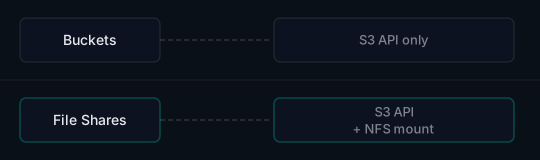
A file share is a bucket with extra metadata that makes it mountable as a filesystem. The underlying storage is the same either way. Choose the access method that fits your use case.
Mounting a Share
# Linux
sudo mount -t nfs -o vers=3 coordinator.mesh:/shares/my-share /mnt/my-share

# macOS
sudo mount_nfs -o vers=3 coordinator.mesh:/shares/my-share /mnt/my-share

# Persistent mount in /etc/fstab (Linux)
coordinator.mesh:/shares/my-share  /mnt/my-share  nfs  vers=3,_netdev  0  0
coordinator.mesh resolves automatically via TunnelMesh's built-in DNS; no /etc/hosts entry is needed.
Controlling Who Can Access What
Access uses the same RBAC roles as the rest of TunnelMesh:
| Role | What they can do |
|---|---|
bucket-admin |
Read, write, manage permissions |
bucket-write |
Read and write |
bucket-read |
Read only |
Assign roles via the CLI:
tunnelmesh share permissions add my-share --peer laptop --role bucket-read
tunnelmesh share permissions add my-share --peer build-server --role bucket-write
Most file operations work as expected. The one gotcha: byte-range locking over a high-latency relay connection isn't reliable. If your application depends on file locks, make sure the peer has a direct UDP connection to the coordinator rather than going through WebSocket relay. Run tunnelmesh status to check.
See the NFS docs for the full troubleshooting guide.
TunnelMesh is released under the AGPL-3.0 License.