Inside the Transport Fallback Chain: UDP, SSH, and WebSocket Relay
TunnelMesh tries hard to connect you directly to your peers. When that fails, it falls back gracefully. When conditions improve, it upgrades automatically. Here's how the whole chain works.
The Three Levels
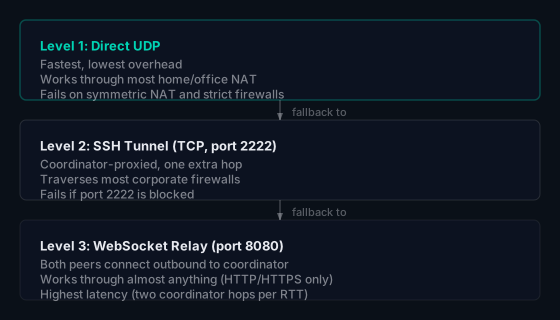
The Noise encryption is identical across all three. Changing transport is transparent to your applications: a connection that starts on WebSocket relay and later gets promoted to direct UDP doesn't drop or reconnect.
Level 1: Direct UDP and Hole-Punching
When two peers want to connect, they both tell the coordinator their public-facing address (the IP and port their router presents to the outside world). The coordinator passes this information between them and signals both sides to fire simultaneously.
Both peers send a UDP packet to each other's public address at the same time. Each outbound packet punches a temporary hole through the sender's NAT, and the incoming packet from the other side arrives while that hole is still open.
This works for most home and office NAT. It fails for symmetric NAT, where the router assigns a different external port for each destination, making the shared address stale by the time the other side uses it.
Level 2: SSH Tunnel
When UDP hole-punching fails, both peers connect to the coordinator on port 2222 over TCP. The coordinator proxies the traffic between them:
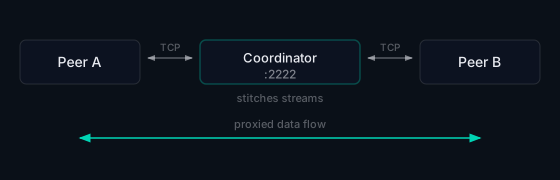
TCP traverses most corporate firewalls. The cost is latency: every packet now makes a round trip through the coordinator instead of going directly.
If you're running the coordinator, you'll need port 2222 open for inbound TCP:
TCP 2222 inbound to coordinator  (SSH relay fallback)
TCP 8080 inbound to coordinator  (coordinator API + WebSocket relay)
Level 3: WebSocket Relay
If port 2222 is also blocked, TunnelMesh falls back to WebSocket relay on port 8080. Both peers make outbound HTTP connections to the coordinator; no inbound connections are required from either peer. The coordinator stitches the two WebSocket streams together.
This works through corporate HTTP proxies, strict egress firewalls, and anything else that allows outbound HTTP/HTTPS. The latency hit is significant; it is useful as a last resort, not for performance-sensitive workloads.
Path Promotion
TunnelMesh doesn't stay on a slower path once it's found one. It continuously probes for better options:
- If a relay connection is active, it still tries direct UDP hole-punching in the background
- When a probe succeeds, the connection is promoted to the faster path, with no reconnect or interruption
- Promotions are gated on a few consecutive successes to avoid flapping on unstable networks
Checking Which Path Is Active
tunnelmesh status
The output labels each peer as direct, ssh-relay, or ws-relay. If a peer you'd expect to reach directly is showing ws-relay, check that port 2222 is reachable on the coordinator.
TunnelMesh is released under the AGPL-3.0 License.