User Identity and Zero Trust in TunnelMesh
"Zero trust" gets attached to a lot of products. In most cases it means "we added MFA." In TunnelMesh it means something specific: being on the mesh gives you nothing by default. Every access (to every service, every port) requires an explicit allow rule.
Where Identity Comes From
Every TunnelMesh peer derives its identity from its SSH key. Run tunnelmesh init and it generates an SSH key pair. The public key gets submitted to the coordinator when you join:
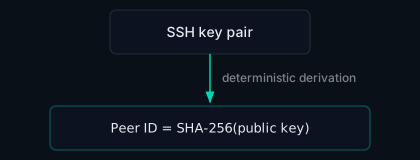
The peer ID is the stable identifier used in admin configuration, filter rules, and RBAC assignments. Unlike a peer name (which the peer controls and can change), the peer ID is derived from the key; you can't spoof a peer ID without controlling the private key.
Enrolment vs. Capabilities
Joining a mesh requires a valid enrolment token. The token gets you on the mesh: a mesh IP, a DNS record, connectivity to other peers. It doesn't get you access to anything.
Capabilities come separately, from an admin:
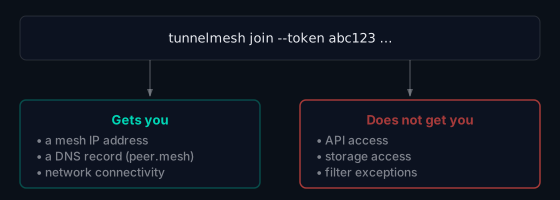
This separation means you can give someone a token to try the mesh, and no services are exposed to them until an admin explicitly grants access.
RBAC: Roles and Groups
TunnelMesh has five built-in roles:
| Role | What it covers |
|---|---|
admin |
Everything: peers, network config, storage, DNS |
bucket-admin |
Manage storage buckets and shares |
bucket-write |
Read and write to buckets/shares |
bucket-read |
Read-only storage access |
system |
Internal service authentication (not assignable manually) |
Three built-in groups make bulk assignment easier: everyone (all enrolled peers), all_admin_users, and all_service_users. You can assign a role to the everyone group to give it to all current and future members.
The Packet Filter: Enforcing Zero Trust on the Network
RBAC covers API and storage access. Network access is enforced separately by the packet filter, a default-deny firewall that runs inside the encrypted tunnel.
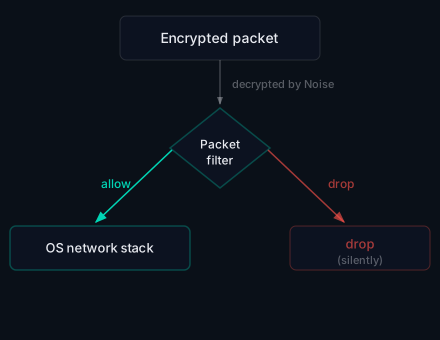
No rule means no access. ICMP (ping/traceroute) and TunnelMesh's own service ports are automatically allowed so the mesh can function. Everything else (SSH, HTTP, your application ports) needs an explicit rule:
# Let admin peers SSH to all nodes
tunnelmesh filter add --src all_admin_users --dst everyone --proto tcp --port 22 --action allow

# Let a specific peer reach a service
tunnelmesh filter add --src laptop --dst build-server --proto tcp --port 8080 --action allow
Admin Configuration
Admin peers are listed by peer ID in the coordinator config, not by name:
admins:
  - peer_id: "a1b2c3d4e5f6..."
Using peer IDs rather than names matters: names are mutable and controlled by the peer. A peer ID is derived from the key and can't be changed without a new key.
Revoking Access
Remove a peer from the coordinator config. From that point it can't exchange keys or obtain relay connections. For immediate revocation, restart the coordinator; active sessions terminate on the next probe cycle.
See the User Identity docs and Admin docs for the full reference.
TunnelMesh is released under the AGPL-3.0 License.