Admin Dashboard Guide
The TunnelMesh admin dashboard is your central view of the mesh. Every peer running in the mesh can reach it at https://this.tm/, a special hostname that always resolves to the coordinator node regardless of where you are in the mesh.
This doc is a reference for what lives in the dashboard and how access to each panel is controlled. For the underlying RBAC model, see User Identity & RBAC.
Dashboard Layout
The dashboard is divided into three tabs along the top: Mesh, App, and Data.
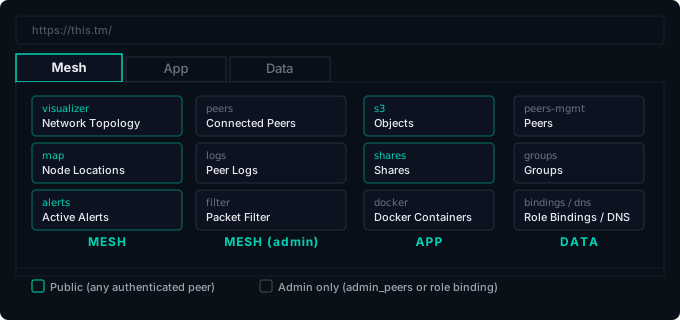
- Mesh: real-time visibility into the network (topology, alerts, traffic)
- App: storage and container management (objects, shares, Docker)
- Data: administrative configuration (peer management, groups, DNS, RBAC)
Public panels are visible to any authenticated mesh peer without additional RBAC grants. Admin-only panels require the peer to be listed in admin_peers or have an explicit role binding.
Panel Reference
Mesh Tab
| Panel ID | Display Name | Public? | Description |
|---|---|---|---|
visualizer |
Network Topology | ✅ yes | Live graph of all peers and their connections. Shows active tunnels, latency, and transport type (SSH/UDP/relay). |
map |
Node Locations | ✅ yes | Geographic map of peer locations, if the coordinator has location tracking enabled. |
alerts |
Active Alerts | ✅ yes | Current mesh-wide alerts: disconnected peers, high latency, failed tunnels. |
peers |
Connected Peers | admin only | Detailed peer list with bandwidth, connection history, and transport info. Allows forcing transport changes. |
logs |
Peer Logs | admin only | Live log stream from any peer in the mesh, streamed through the coordinator. |
filter |
Packet Filter | admin only | View and edit global packet filter rules. Shows per-rule match metrics. |
App Tab
| Panel ID | Display Name | Public? | Description |
|---|---|---|---|
s3 |
Objects | ✅ yes | S3-compatible object browser. Peers can see buckets and objects they have RBAC access to. |
shares |
Shares | ✅ yes | File share browser. Lists shares the current peer is allowed to access. |
docker |
Docker Containers | admin only | View containers running on any mesh node. Start, stop, restart, and stream logs, without SSH-ing into each machine. |
Data Tab
| Panel ID | Display Name | Public? | Description |
|---|---|---|---|
peers-mgmt |
Peers | admin only | Peer registry: view all known peers, their IDs, groups, and last-seen timestamps. |
groups |
Groups | admin only | Manage peer groups used in RBAC bindings. |
bindings |
Role Bindings | admin only | View and create RBAC role bindings that grant permissions to peers and groups. |
dns |
DNS Records | admin only | Inspect and manage mesh DNS records (.tunnelmesh zone). |
Panel Access Control
Panel visibility is governed by the same RBAC system used for everything else in TunnelMesh. Concretely:
Public panels (visualizer, map, alerts, s3, shares) are visible to every peer that is successfully connected to the mesh. No additional configuration is needed.
Admin panels are visible to peers listed in admin_peers in the coordinator config. These peers get the full admin role, which includes all panels.
Selective grants let you give a non-admin peer access to a specific admin panel without full admin rights:
# Grant a peer access to the Docker panel only
tunnelmesh role bind alice panel-viewer --panel-scope docker

# Grant a peer access to the logs and peers panels
tunnelmesh role bind alice panel-viewer --panel-scope logs
tunnelmesh role bind alice panel-viewer --panel-scope peers

# Use a group for shared access
tunnelmesh group create monitoring-team
tunnelmesh group add-member monitoring-team alice
tunnelmesh group bind monitoring-team panel-viewer --panel-scope peers
tunnelmesh group bind monitoring-team panel-viewer --panel-scope logs
Selective panel grants are useful for on-call engineers who need to see peer logs or container stats without being full mesh admins. Grant the minimum set of panels they actually need.
See User Identity & RBAC for the full RBAC documentation.
Plugin Panels
Plugins can register additional panels in any tab using the Register API. Plugin panels are of type External and can embed content via iframe or script injection.
# List all registered panels (including plugin panels)
tunnelmesh panel list

# List only plugin (external) panels
tunnelmesh panel list --external
Plugin panels appear in the tab they registered under. Admins can control their visibility using the same --panel-scope mechanism as built-in panels.
Plugin panels cannot override built-in panels; registering a panel with an existing built-in ID returns an error. Use distinct IDs for plugin panels.
TunnelMesh is released under the AGPL-3.0 License.