Internal Packet Filter
TunnelMesh includes a built-in internal packet filter that controls which ports are accessible on each peer within the mesh. Default is secure: Allowlist mode (deny by default) unless explicitly configured otherwise. Only allowed ports are accessible.
Overview
Use coordinator for mesh-wide rules: Common ports like SSH and metrics should be allowed at the coordinator level. Use peer config for local services. Use temporary rules (CLI/admin panel) for testing before committing to config.
- Default deny mode: Block all incoming ports unless explicitly allowed (allowlist)
- Per-peer rules: Target specific source peers for fine-grained access control
- 4-layer rule system: Coordinator, peer config, temporary, and service rules merge together
- Real-time updates: Admin panel changes push to peers immediately
- Prometheus metrics: Track filtered packets with per-peer labels
Rule Hierarchy
Rules come from four sources, merged with "most restrictive wins" logic:
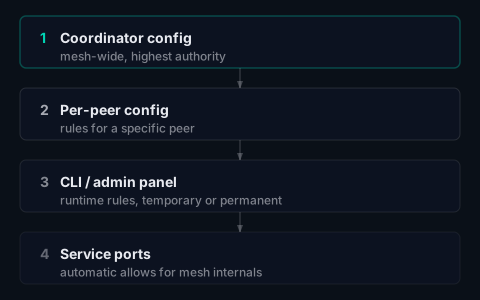
Conflict resolution: most restrictive wins. If any source says "deny", the port is denied. "allow" only wins if no source denies.
Service Ports
When a peer connects to the coordinator, the coordinator automatically pushes service port rules. These allow access to essential coordinator services:
- Admin dashboard port (typically 443 or 8080)
Service rules:
- Are shown in the admin UI with source "service"
- Cannot be removed via CLI or admin panel
- Persist as long as the peer is connected
Configuration
Coordinator Config (server.yaml)
Global rules pushed to all peers when they connect:
filter:
  # default_deny defaults to true (allowlist mode) if not specified
  # Set to false only if you want blocklist mode (allow all unless denied)
  rules:
    # Allow SSH across the entire mesh
    - port: 22
      protocol: tcp
      action: allow

    # Allow metrics port
    - port: 9443
      protocol: tcp
      action: allow

    # Block untrusted peer from accessing databases
    - port: 3306
      protocol: tcp
      action: deny
      source_peer: untrusted-peer
Peer Config (peer.yaml)
Local rules for this specific peer:
filter:
  rules:
    # Allow HTTP on this web server
    - port: 80
      protocol: tcp
      action: allow

    # Allow HTTPS
    - port: 443
      protocol: tcp
      action: allow

    # Deny SSH from dev machines (overrides coordinator allow)
    - port: 22
      protocol: tcp
      action: deny
      source_peer: dev-workstation
Rule Fields
| Field | Type | Required | Description |
|---|---|---|---|
port |
integer | Yes | Port number (1-65535) |
protocol |
string | Yes | tcp or udp |
action |
string | Yes | allow or deny |
source_peer |
string | No | Peer name to match (empty = any peer) |
CLI Commands
List Rules
tunnelmesh filter list

# Output:
# PORT  PROTOCOL  ACTION  SOURCE PEER  SOURCE       EXPIRES
# 22    TCP       allow   *            coordinator  -
# 80    TCP       allow   *            config       -
# 3306  TCP       deny    dev-peer     temporary    2h
#
# Default policy: deny (allowlist mode - only allowed ports are accessible)
# Total rules: 3
Add Temporary Rule
# Allow SSH from any peer
tunnelmesh filter add --port 22 --protocol tcp

# Allow with expiry (1 hour)
tunnelmesh filter add --port 80 --protocol tcp --ttl 3600

# Deny specific peer
tunnelmesh filter add --port 22 --protocol tcp --action deny --source-peer badpeer

# Block UDP port from any peer
tunnelmesh filter add --port 53 --protocol udp --action deny
Remove Temporary Rule
# Remove global rule
tunnelmesh filter remove --port 22 --protocol tcp

# Remove peer-specific rule
tunnelmesh filter remove --port 22 --protocol tcp --source-peer badpeer
Only temporary rules (added via CLI or admin panel) can be removed. Rules from config files must be removed by editing the config.
Admin Dashboard
The admin panel provides an "Internal Packet Filter" section for managing rules:
- Select peer to view their current filter rules
- Add Rule button opens a form with:
- Port number
- Protocol (TCP/UDP)
- Action (Allow/Deny)
- From Peer (source peer selector, or "Any peer")
- To Peer (destination peer, or "All peers")
- Remove button on temporary rules
Rules pushed via admin panel take effect immediately on the target peer(s).
Important notes:
- When pushing to "All peers", a confirmation dialogue is shown
- A peer cannot create a rule filtering traffic from itself (self-targeting is prevented)
- A warning banner appears when temporary rules exist, reminding that they won't persist after peer restart
Per-Peer Filtering
Filter rules can target specific source peers, enabling scenarios like:
Allow SSH only from admin machines
filter:
  default_deny: true
  rules:
    - port: 22
      protocol: tcp
      action: allow
      source_peer: admin-workstation
Block untrusted peer from sensitive ports
filter:
  rules:
    - port: 22
      protocol: tcp
      action: deny
      source_peer: contractor-laptop
    - port: 3306
      protocol: tcp
      action: deny
      source_peer: contractor-laptop
Peer-specific rules take precedence
When both global and peer-specific rules exist:
rules:
  - port: 22
    protocol: tcp
    action: allow           # Global: allow SSH

  - port: 22
    protocol: tcp
    action: deny
    source_peer: badpeer    # Deny SSH from badpeer
Traffic from badpeer to port 22 is denied, while all other peers are allowed.
Metrics & Monitoring
Prometheus Metrics
| Metric | Labels | Description |
|---|---|---|
tunnelmesh_dropped_filtered_total |
protocol, source_peer |
Counter of packets dropped by filter |
tunnelmesh_filter_rules_total |
source |
Gauge of rule counts by source |
tunnelmesh_filter_default_deny |
- | 1 if default-deny mode, 0 otherwise |
Example queries:
# Filtered packets rate by peer
rate(tunnelmesh_dropped_filtered_total[5m])

# Top blocked source peers
topk(5, sum by (source_peer) (rate(tunnelmesh_dropped_filtered_total[5m])))
Alerts
Default alerts in monitoring/prometheus/alerts.yml:
# Elevated filter drops (possible attack or misconfiguration)
- alert: TunnelMeshElevatedFilteredDrops
  expr: sum by (peer, source_peer) (rate(tunnelmesh_dropped_filtered_total[5m])) > 10
  for: 5m
  labels:
    severity: warning
  annotations:
    description: "Packet filter blocking >10 packets/s from '{{ $labels.source_peer }}'"

# Multiple sources being blocked
- alert: TunnelMeshMultipleSourcesBlocked
  expr: count by (peer) (rate(tunnelmesh_dropped_filtered_total[5m]) > 1) > 3
  for: 5m
  labels:
    severity: warning
  annotations:
    description: "{{ $value }} different source peers being blocked on {{ $labels.peer }}"
ICMP Handling
ICMP always allowed: Ping and traceroute work regardless of filter configuration. Only TCP and UDP traffic is subject to filter rules. This ensures basic network diagnostics always work.
ICMP traffic (ping, traceroute) is always allowed through the filter for diagnostic purposes. Only TCP and UDP packets are subject to filter rules.
Best Practices
Security first: Never set default_deny: false in production. Allowlist mode (default deny) is
the secure default. Only explicitly allowed ports should be accessible.
Default is secure: The filter defaults to
default_deny: true(allowlist mode) if not specified. Only setdefault_deny: falseif you explicitly want blocklist mode.Use coordinator for mesh-wide rules: Common ports like SSH and metrics should be allowed at the coordinator level.
Use peer config for local services: Web servers, databases, and other services specific to a peer should be configured locally.
Use temporary rules for testing: Add rules via CLI to test before committing to config.
Monitor filtered packets: Watch the
tunnelmesh_dropped_filtered_totalmetric for unexpected blocks or attack patterns.Use per-peer rules sparingly: Global rules are easier to manage. Use per-peer rules only when necessary for security isolation.
Troubleshooting
Connection refused but no filter rule
Check if default_deny is enabled:
tunnelmesh filter list
# Look for "Default policy: deny"
Add an allow rule:
tunnelmesh filter add --port 8080 --protocol tcp
Rule not taking effect
- Verify the rule exists:
tunnelmesh filter list - Check rule precedence - deny always wins
- Verify protocol matches (TCP vs UDP)
- For peer-specific rules, verify peer name matches exactly
Debug logging
Enable debug logging to see filter decisions:
tunnelmesh join --log-level debug
# Look for "filter" or "dropped" in logs
TunnelMesh is released under the AGPL-3.0 License.