User Identity and RBAC
TunnelMesh provides automatic identity management with Kubernetes-style RBAC for access control.
Overview
Your user identity is derived from your peer's SSH key - the same key used for mesh networking. This means:
- Automatic Identity: No separate user setup needed - just
jointhe mesh - Admin Authorisation: Admins are configured via coordinator's admin_peers list (peer ID or name)
- Share Across Devices: Copy
~/.tunnelmesh/id_ed25519to use the same identity on multiple machines - RBAC Authorisation: Fine-grained access control for S3 buckets and dashboard panels
How Identity Works
When you run tunnelmesh join, your identity is automatically created:
- SSH Key Generated: On first join, an ED25519 keypair is created at
~/.tunnelmesh/id_ed25519 - User ID Derived:
SHA256(public_key)[:8]as hex (16 characters) - Auto-Registered: Added to the "everyone" group with default permissions
- Admin Authorisation: If your peer is in coordinator's admin_peers list, you get admin privileges
# Join the mesh - identity is automatic
tunnelmesh join coord.example.com --token <token> --context work

# View your identity
tunnelmesh status
Admin Peer Configuration
Admin privileges are granted via the coordinator's admin_peers configuration - there is no
automatic "first user becomes admin" behaviour.
# coordinator.yaml
coordinator:
  enabled: true
  admin_peers:
    - "a1b2c3d4e5f6g7h8"  # Peer ID (preferred - derived from SSH key, 16 hex chars)
    - "alice"             # Peer name (fallback - can change)
Recommended: Use Peer IDs for security:
- Peer IDs are immutable (SHA256 of SSH public key)
- Peer names can be changed by users
- View your peer ID:
tunnelmesh status
On first join, peers matching admin_peers are automatically:
- Added to the "admins" group
- Granted full admin role with panel access
- Can manage buckets, users, groups, filter rules, and Docker containers
Sharing Identity Across Devices
To use the same identity on multiple devices, copy your SSH key:
# On your original device
scp ~/.tunnelmesh/id_ed25519* user@new-device:~/.tunnelmesh/

# On the new device, join with a different peer name
tunnelmesh join coord.example.com --token <token> --context work --name laptop-2
Both devices will have:
- Same User ID - same RBAC permissions
- Different Peer Names - separate mesh identities
- Different Mesh IPs - unique network addresses
If you try to join with the same hostname as an existing peer with a different key, the coordinator will auto-suffix
your name (e.g., laptop becomes laptop-2).
RBAC System
TunnelMesh uses Kubernetes-style Role-Based Access Control.
Built-in Groups
| Group | Description |
|---|---|
everyone |
All registered users - default group for new peers |
all_admin_users |
Admin users with full access |
all_service_users |
Service accounts (internal use) |
Built-in Roles
| Role | Description | Permissions |
|---|---|---|
admin |
Full access | All operations on all resources |
bucket-admin |
Bucket management | Create/delete buckets, full object access |
bucket-write |
Write access | Read buckets, full object CRUD |
bucket-read |
Read-only access | Read buckets and objects |
system |
Coordinator internal | Access to _tunnelmesh/ bucket only |
Role Permissions
admin:
  - *:*                           # All verbs on all resources

bucket-admin:
  - create,delete,get,list:buckets
  - get,put,delete,list:objects

bucket-write:
  - get,list:buckets
  - get,put,delete,list:objects

bucket-read:
  - get,list:buckets
  - get,list:objects

system:
  - *:* (on _tunnelmesh/ only)
View Roles
tunnelmesh role list
Create Custom Role
tunnelmesh role create my-role --verbs get,list --resources buckets,objects
Bind Role to User
# Global binding (all buckets)
tunnelmesh role bind alice admin

# Scoped binding (specific bucket)
tunnelmesh role bind bob bucket-write --bucket my-bucket
View Bindings
tunnelmesh role bindings
tunnelmesh role bindings --user alice
Service Users
The coordinator uses service users for internal authentication:
- ID Format:
svc:{service-name}(e.g.,svc:coordinator) - Keypair: Derived from CA private key via HKDF
- Role:
systemrole for_tunnelmesh/access
Service users authenticate to S3 like regular users but have their keypair derived deterministically from the mesh CA.
Identity Architecture
File Layout
~/.tunnelmesh/
  id_ed25519                     # SSH private key (your identity)
  id_ed25519.pub                 # SSH public key
  contexts/
    work/
      config.yaml                # Peer config
    home/
      config.yaml
Key Derivation
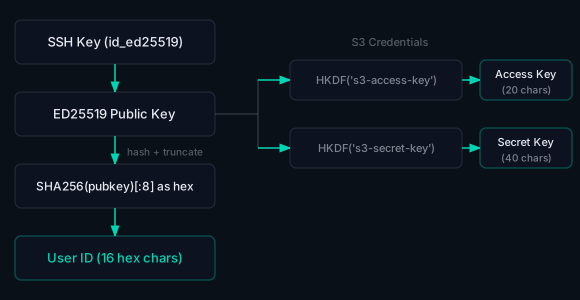
S3 credentials are derived from the public key:
Access Key(20 chars): derived viaHKDF("s3-access-key")Secret Key(40 chars): derived viaHKDF("s3-secret-key")
Security Considerations
Key Storage
- Private keys are stored in
~/.tunnelmesh/id_ed25519with 0600 permissions - Never share your private key
- Treat your SSH key like any other SSH private key
Revoking Access
To revoke a user's access to a mesh, an admin can remove them from groups:
# Via dashboard admin panel, or API
# Remove user from groups / delete their bindings
CLI Reference
# Role management (admin only)
tunnelmesh role list                     # List all roles
tunnelmesh role create NAME [--verbs V] [--resources R]
tunnelmesh role delete NAME              # Delete custom role

# Binding management (admin only)
tunnelmesh role bind USER ROLE [--bucket B]
tunnelmesh role unbind USER ROLE [--bucket B]
tunnelmesh role bindings [--user U]

# Group management (admin only)
tunnelmesh group list                    # List all groups
tunnelmesh group members GROUP           # List group members
tunnelmesh group add-member GROUP USER   # Add user to group
tunnelmesh group remove-member GROUP USER # Remove user from group
TunnelMesh is released under the AGPL-3.0 License.